Article
Using a single GPU like multiple GPUs

Understanding and Operating NVIDIA MIG
What technology is needed to safely and efficiently share a single GPU across multiple workloads? Let's start by understanding the basic concepts and operation of MIG, and then step-by-step explore profile configuration, operational constraints, virtualization/Kubernetes integration, GPU networking, monitoring & failure analysis, and AI-based optimization.
Why Share GPUs?
GPUs are among the most expensive resources in AI infrastructure. However, in reality, not all workloads utilize the full performance of a GPU at all times. Inference, embedding, and development/testing environments often only require a fraction of the compute resources and memory. This is why technologies that allow multiple users to share a single GPU have become crucial.
Method | Core Concept | Suitable Environment |
PCI Passthrough | A VM exclusively dedicates the entire GPU card | Large-scale training, maximum performance |
Time-Sliced vGPU | Multiple VMs share GPU compute time | Bursty development/VDI/lightweight inference |
MPS | Multiple CUDA processes efficiently share compute resources on the same GPU | Multi-processing on the same GPU |
MIG | GPU internal resources are partitioned into hardware divisions | Multi-tenant inference, services where SLA and isolation are critical |
MIG Explained Simply
MIG (Multi-Instance GPU) is a technology that divides a single GPU to function as multiple small, independent GPUs. It doesn't just slice the memory; it partitions both compute and memory resources together based on the GPU model and profile.
As an analogy, Passthrough is like a single team occupying an entire large office, Time-Slicing is like teams taking turns to use a single meeting room according to a schedule, and MIG is closer to installing physical partitions in a large office to assign dedicated spaces to each team.
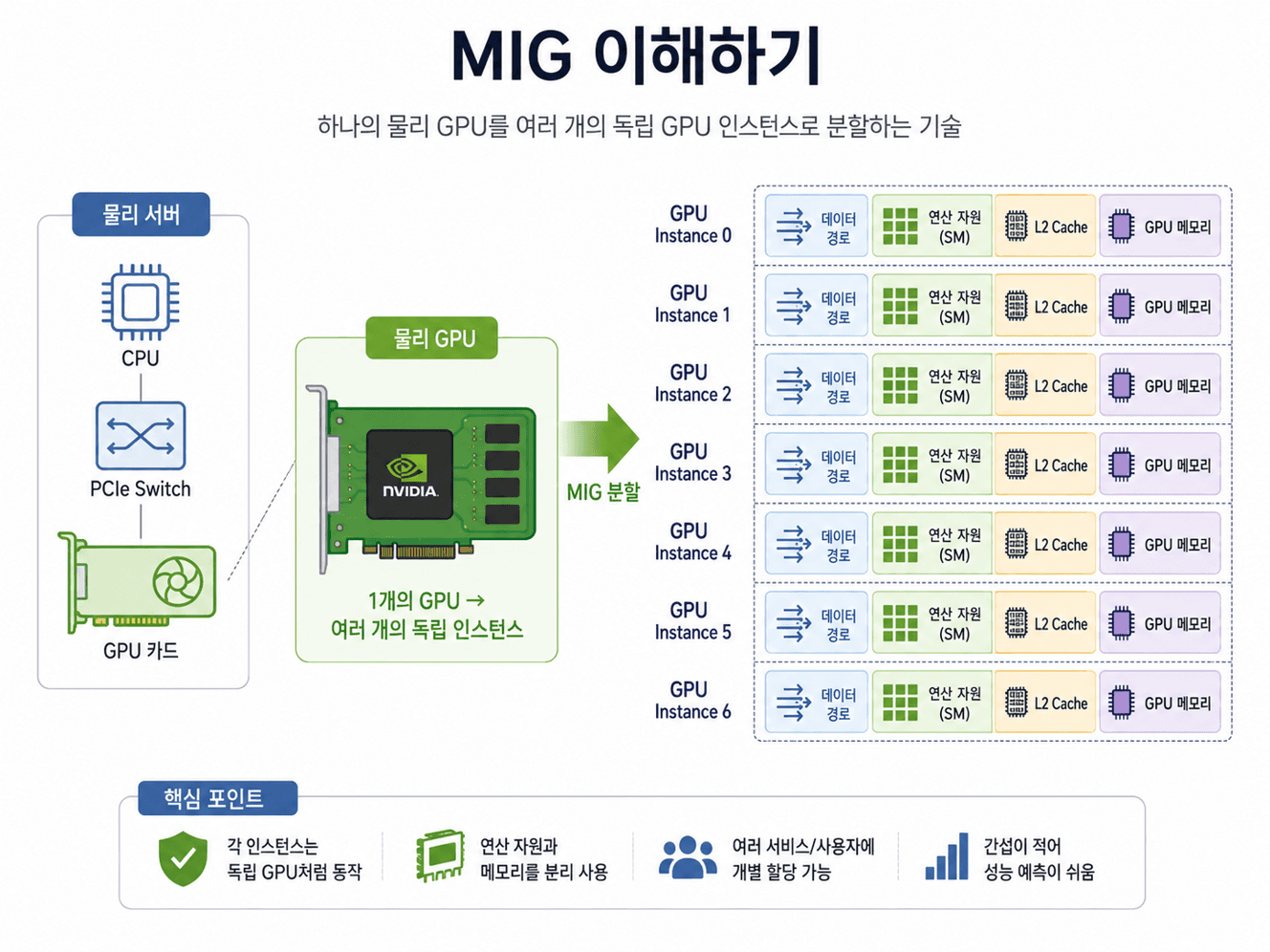
TL;DR so far ① MIG increases isolation and predictability through hardware resource partitioning. ② On the downside, Profiles are fixed, and reconfiguration may require downtime. ③ In actual operations, you must monitor GPU, VRAM, PCIe, NVLink, Fabric, Health, and VM/Pod allocation relationships together. |
How to Understand MIG Profiles?
MIG does not partition resources into arbitrary sizes; instead, it uses predefined Profiles specified for each GPU model. For example, they are expressed as 1g.10gb, 2g.20gb, 3g.40gb, etc. The number of instances and use cases vary depending on the chosen Profile.
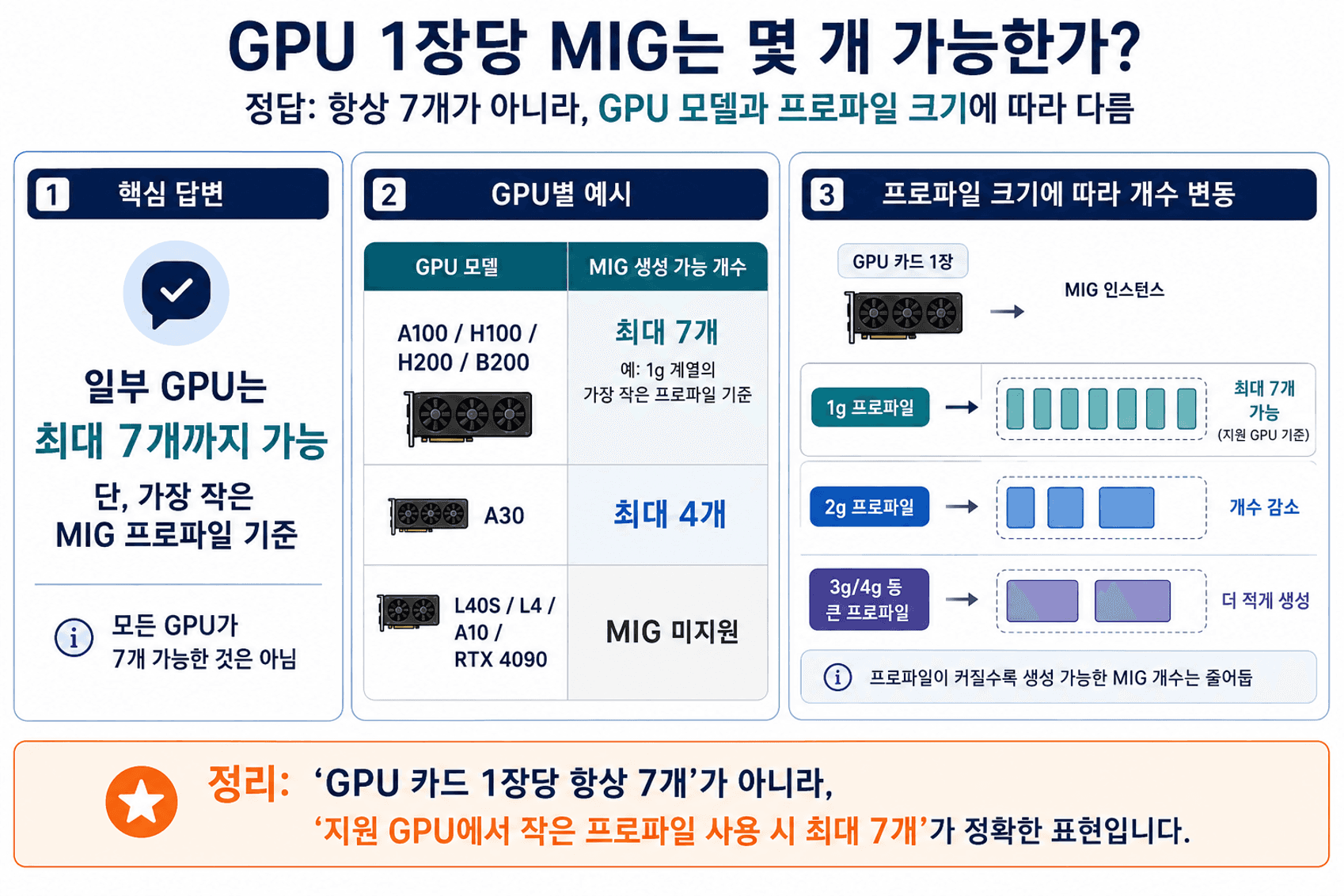
Actual placement is not completely free; it must follow the supported Placement combinations. Additionally, since some GPU generations feature an asymmetric resource architecture—such as Compute 7 and Memory 8—finer partitioning can sometimes leave unused leftover memory.
Constraints and Trade-offs to Know in Practice
While MIG is extremely useful, it is not a silver bullet. Activating MIG mode or changing layout configurations can require workload suspension, GPU resets, or node reboots. Moreover, if one Instance is idle, other Instances cannot dynamically borrow its resources on the fly.
Cases where it is better not to use MIG: ① Large-scale multi-GPU training ② Bursty workloads ③ Large models that do not fit into a single MIG Profile's memory |
Item | Why it Matters |
Downtime during Reconfiguration | Changing MIG modes or layouts may involve GPU resets, node reboots, and Pod terminations. |
Limits in Idle Resource Reclaiming | Since idle resources from other MIGs cannot be borrowed instantly, Time-Slicing might be more efficient for bursty loads. |
Performance is Not Simply Proportional | Due to differences in compute, memory, and cache configurations across Profiles, performance cannot be calculated by simple linear scaling. |
Large Model Limitations | If the model/cache does not fit in a single Profile's memory, utilizing the full GPU or other methods is more appropriate than MIG. |
Key Points in Supported GPUs and Licensing
Data center GPUs such as the A100/A30, H100/H200, B200, and some RTX PRO Blackwell products support MIG. On the other hand, L40S, L4, A10, and standard GeForce series must be distinguished from MIG. Architectures where multiple VMs share an L40S are generally understood as Time-Sliced vGPU, not MIG.
Additionally, while MIG is a native GPU feature, deploying MIG-backed vGPUs to VMs in VMware/KVM environments may require NVIDIA vGPU for Compute configurations and NVIDIA AI Enterprise licensing.
How is MIG Allocated to VMs in vCenter?
From an operations standpoint, the most crucial task is tracking which MIG instance of which physical GPU is connected to which VM. Unallocated MIGs must be visible alongside allocated ones to properly evaluate the remaining capacity.
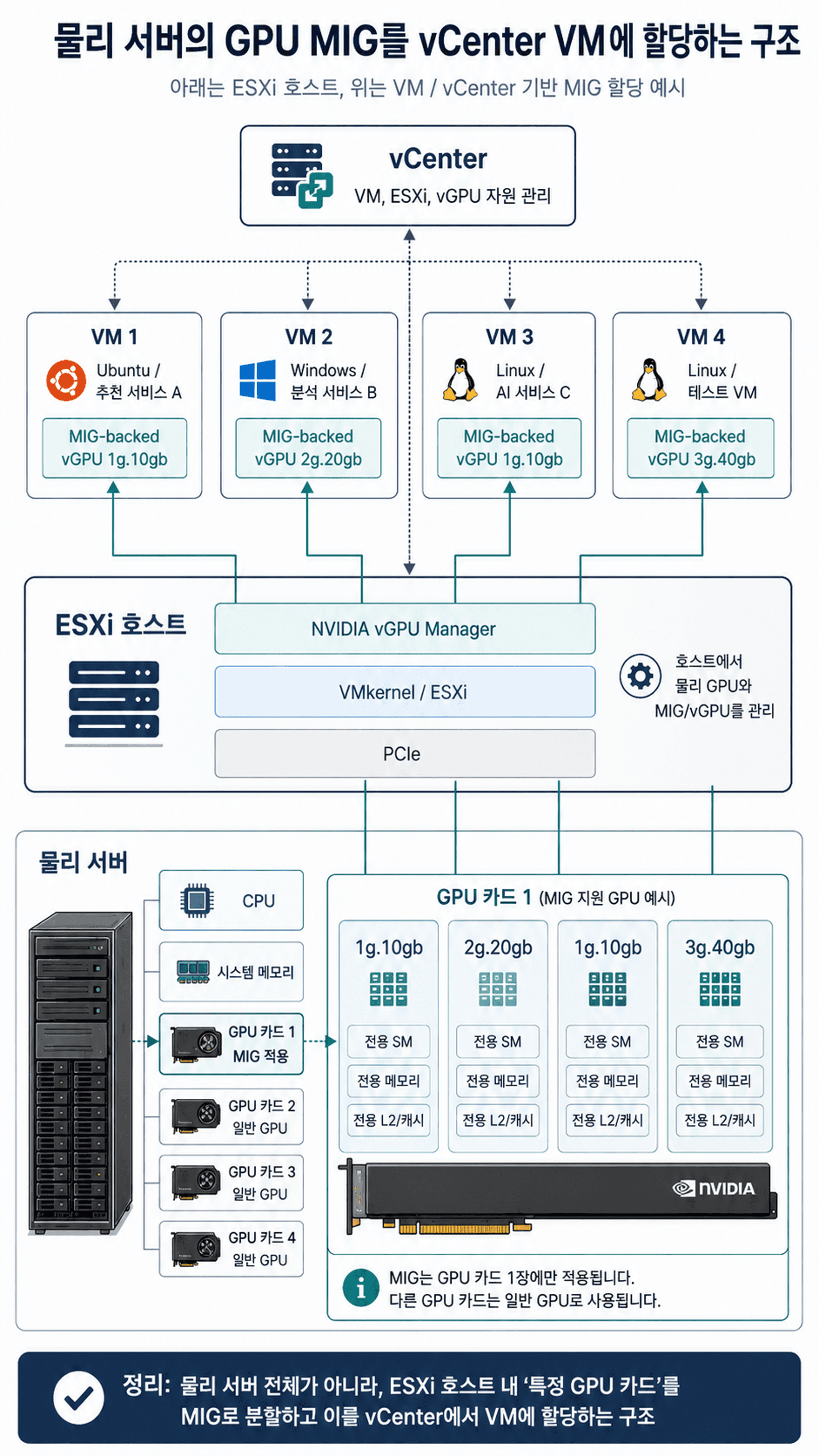
Inside a VM, you can check the utilization and VRAM usage of your allocated GPU/vGPU/MIG range using nvidia-smi and NVML. However, to see the entire infrastructure topology, you must combine vCenter/ESXi configuration details with NVIDIA telemetry data.
Extending the Architecture to Kubernetes
When Kubernetes is deployed on top of VMs, the relational topology expands: Physical GPU → MIG → VM → Kubernetes Node → Pod. Using the NVIDIA GPU Operator, Device Plugin, and MIG Manager, you can expose MIG instances as Kubernetes Resources. During this, MIG reconfiguration plans must account for Pod interruptions and node reboot designs.

MIG and GPU Networks Serve Different Roles
MIG is a technology for partitioning a single GPU, whereas NVLink, InfiniBand, and RoCE are technologies for interconnecting multiple GPUs or servers. Therefore, these two pillars should not be treated as serving the same function.
In particular, MIG's objective differs from utilizing NVLink P2P at the CUDA level in traditional setups. While recent versions of NCCL have added experimental support for using multiple MIG Instances, many constraints remain, and large-scale distributed training nodes generally differ in design direction from multi-tenant inference nodes.

Essential Metrics to Track in GPU Monitoring
GPU monitoring does not end with a single GPU Utilization metric. To explain bottlenecks and the root causes of failures, you must look at GPU/VRAM, NVLink, PCIe, temperature/fan, power, XID/ECC, and MIG allocation information together.
Perspective | Key Metrics | Operational Meaning |
GPU | GPU Utilization, SM/Tensor Activity | Verify parallel compute engine utilization |
VRAM | Memory Allocation, Used/Total, Utilization | Check memory footprint of models, caches, and data along with actual usage rates |
NVLink | TX/RX, Bandwidth, Link State, Error | Verify parallel communication health between GPUs |
PCIe Bus | TX/RX, Link Gen/Width, Replay/Error | Identify data transfer bottlenecks between CPU/Storage/NIC and GPU |
Temperature & Fan | GPU/Memory Temperature, Fan Speed, Throttling | Monitor heating/cooling and Thermal Throttling |
Power | Power Draw, Power Limit, Energy | Check real-time power consumption and Power Throttling |
XID / ECC | XID, Correctable/Uncorrectable ECC, Row Remapping | Detect warning signs of GPU, Driver, and Memory failures |
MIG | Profile, Allocated/Free, VM Mapping, Utilization | Monitor virtual GPU Capacity and actual utilization |
Why Data Collection Design Matters
GPU operational data cannot be fully captured from a single source. The vCenter API excels at showing 'who received what,' but falls short on actual utilization and hardware health details. Conversely, NVML/DCGM provides excellent visibility into actual GPU state, but lacks context on VM/ESXi inventory mapping. Fabric telemetry requires another independent collection system.
Collection Source | Strengths | Needs Complementing |
vCenter API | ESXi, VM, and GPU/vGPU configuration relationships and inventory | Actual GPU/VRAM utilization and detailed health metrics |
NVML / nvidia-smi | GPU/MIG utilization, VRAM, Processes, and partial states | Virtualization inventory and upper-level object relationships |
DCGM / DCGM Exporter | GPU Performance, Health, ECC, NVLink, and Kubernetes metrics | vCenter-based virtualization mapping information |
Fabric Telemetry | InfiniBand/RoCE Port, Bandwidth, Congestion, and Errors | Direct mapping to internal GPU resources |
How Failure Analysis Connects the Dots
In failure analysis, context is more important than a simple alert. For instance, a drop in GPU Utilization does not necessarily mean the GPU itself has a problem. It could be a PCIe bottleneck, an NVLink error, or throughput degradation due to Fabric congestion. Additionally, errors associated with modern data center GPUs—such as XID 31/48/74/79 and XID 94/95—serve as crucial clues when diagnosing root causes.
Beyond Monitoring: AI Anomaly Detection and Optimization
The ultimate goal goes beyond merely showing the current utilization percentage. Correlating time-series data from GPUs, MIGs, VMs, and Fabrics allows you to scale up to anomaly detection, bottleneck root cause analysis, demand forecasting, predictive maintenance, and FinOps.

Expansion Goal | Meaning |
Capacity Planning | Distinguish whether GPUs are truly lacking, idle, or over-allocated, and forecast future demand |
Predictive Health | Detect pre-failure symptoms based on temperature, power, ECC, and XID patterns |
GPU FinOps | Identify unused GPUs, under-utilized MIGs, and over-allocated VMs for reallocation or reclamation |
What Should a Unified Dashboard Show?
A good dashboard should have a layout that links Capacity → Allocation → Performance → Fabric → Health → AI Insight. The top section should display overall GPU/MIG counts, allocated/unallocated states, average GPU/VRAM utilization, and active alarms. The center should visually map vCenter → ESXi → VM ↔ MIG → GPU → Physical Server relationships.
By displaying the OS, allocation, and actual usage on VMs; utilization, VRAM, temperature, power, and NVLink status on GPUs; and profile, allocation state, and VM mapping on MIGs, operators can comprehend the resource architecture and usage patterns at a single glance.
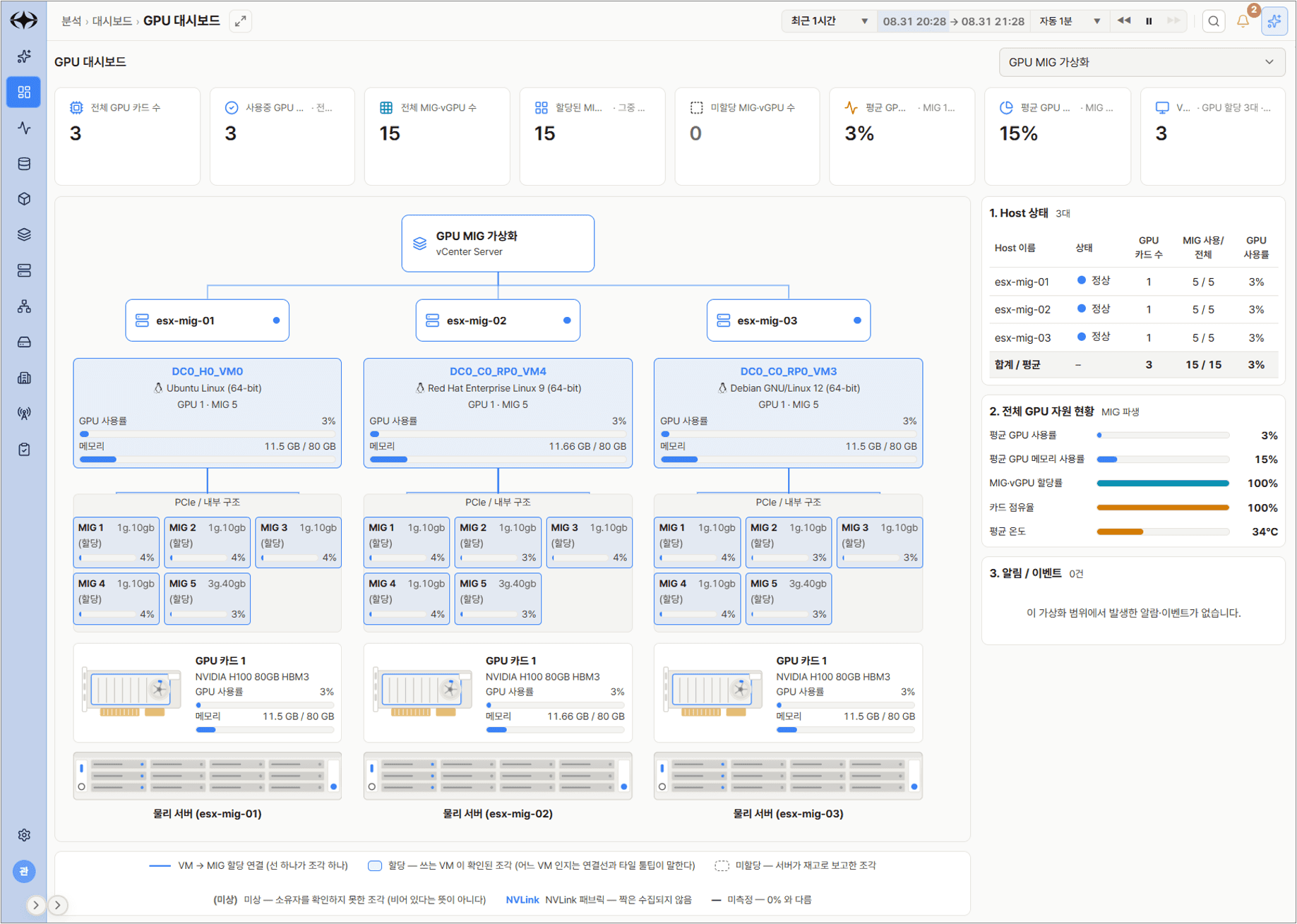
<Example of Polestar 10 GPU Dashboard>
Wrapping Up
MIG is a technology that does much more than just split a single GPU card into pieces. However, it is not the right answer for every workload. It is crucial to choose between Passthrough, Time-Slicing, MPS, and MIG depending on your workload characteristics, and to treat GPU, VRAM, PCIe, NVLink, InfiniBand/RoCE, and XID/ECC as a unified Resource Topology.
And by extending this data to anomaly detection, prediction, and optimization, GPU monitoring can evolve from a basic monitoring system into an AI infrastructure operations platform.
References
• NVIDIA Multi-Instance GPU User Guide — MIG concepts, supported GPUs/Profiles, and deployment considerations
• NVIDIA AI Enterprise vGPU for Compute — Time-Sliced vGPU, MIG-backed vGPU, and licensing
• NVIDIA NCCL User Guide — Recent experimental support and NVLink constraints when using MIG Instances
Written by: DW Jang | Nkia Research Lab


